Visualize Your Hardware
In Real-Time
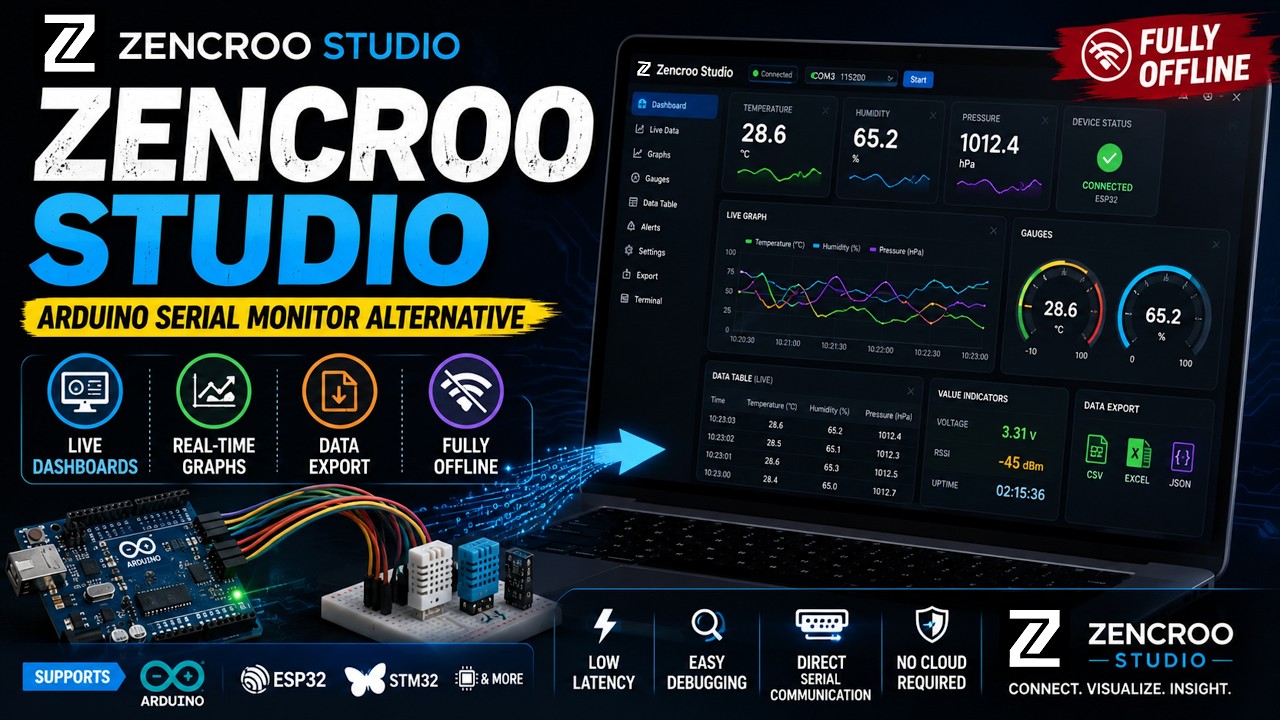
Zencroo Studio is a production-grade offline desktop monitor and layout builder that transforms raw serial streams into custom interactive dashboard visualizations.
> [SYSTEM] Initializing...
> [INFO] COM3 (115200)
> 24.50,60.20
> Sensor A: 24.50 °C
> Sensor B: 60.20 %
Temperature
24.50 °C
Humidity
60.20 %
Baud Rate
115200
Real-time Stream
Interactive Dashboard
Real-time Serial Visualization
Integrated Workspace Architecture
Four functional tracking zones designed to unify data routing control.
Top Navigation
Access advanced system menus like File, Device, View, Dashboard, Data, Tools, and Window allocations instantly.
Left Sidebar
Manage raw hardware node entry options, configure asynchronous serial COM links, and parse active profiles.
Right Sidebar
Track live communication data packet performance, data stream error sets, and access the command console pipelines.
Main Workspace
Switch seamlessly between raw diagnostic text streams, dashboard designer canvases, or split mixed multi-views.
Video Demonstration
Watch Zencroo Studio in action to see how easily you can build real-time serial dashboards.
Powerful Features for Engineers
Everything you need to debug, monitor, and document your serial data streams.
Plug-and-Play
Auto-detects connected microcontrollers. Fast setup, immediate detection, and fluid interaction management up to 230,400 bauds.
Dual View Mode
Switch between a standard logging text console and a custom canvas visual terminal panel.
Drag-and-Drop
Choose from an advanced widget set. Drop charts, custom toggles, text nodes, or gauges onto the canvas layout workspace.
DataStream Mapping
Define string splits using data tags. Seamlessly map parsed comma variables directly to Integers, Doubles, or Strings.
Bi-Directional Terminal
Send raw message arrays or setup persistent command line ending parameters and quick macro banks.
100% Secure & Offline
Maintains absolute operational integrity completely offline. Zero external cloud dependencies mean your parameters stay secure.
Quick Start Workflow
A streamlined setup sequence to transition from raw microcode to custom dashboard visual trackers.
Create Project
Initialize a new workspace dashboard profile by executing the Ctrl+N wizard sequence.
Connect Device
Select your active hardware COM node connection port and match your sketch's explicit Baud Rate logic.
Map Streams
Open Stream configurations (Ctrl+M) and assign target data index locations to custom system tags.
Build Views
Drag widget frames from the palette panel and link variable arrays directly to begin live monitoring tracks.
Supported Target Hardware
Compatible with any electronic infrastructure deploying standard asynchronous serial arrays.
Arduino Implementation Guide
Format raw logs properly with comma divisions followed immediately by newline markers.
void setup() {
  // Initialize asynchronous link path
  Serial.begin(115200);
}

void loop() {
  float temperature = readSensors();
  float humidity = readHumidity();

  // Structural parser constraint requirement: Data1,Data2\n
  Serial.print(temperature);
  Serial.print(",");
  Serial.println(humidity);

  delay(1000);
}24.50,60.2024.60,60.30[Active Structural Profile Mapping Configuration]• Parsing Data Point 1 index array ➔ Field: Temperature (°C)• Parsing Data Point 2 index array ➔ Field: Humidity (%)[Workspace Evaluation Pipeline Logs]✔ High-frequency viewport rendering engine: Running✔ Local storage CSV file cache mapping: Active✔ Dashboard canvas synchronization layer: ConnectedDownload Zencroo Studio
Version 1.0.1 Stable Build Architecture
Native Windows Setup • 4GB System RAM Configuration Requirement • 100MB Disk Space Minimum
Standard Setup Installer
Recommended for production workstations. Registers environment pathways and manages background system upgrade sequences.
Portable Binary Package
Perfect for field engineers and restrictive workshop systems. Runs directly from local memory drives without administrator privilege requirements.
Frequently Asked Questions
Quick clarity queries regarding system integrations.
What specific embedded hardware environments are compatible?+
Any system processing strings or numeric configurations over asynchronous COM channels (including Arduino lines, ESP32 nodes, STM32 cores, Raspberry Pi, and industrial PLC frames) matches parameters seamlessly.
Does Zencroo Studio transfer active monitoring logs to third-party cloud platforms?+
No. Zencroo Studio runs completely offline and locally on your local asset workstation. Your engineering telemetry arrays, mapping profiles, and log histories remain secured locally.
Can logged hardware diagnostics strings be extracted for multi-variant data modeling workflows?+
Yes. The platform includes local data logging configuration tools. Engineers can easily output complete testing histories as structured CSV spreadsheets for third-party evaluation.
Is there an upper constraint to the number of dashboards I can generate?+
No constraint limit exists. You can create, adjust, save, and reload infinite configuration profiles and layout structures tailored to distinct sensory tracking projects.
How are code vulnerabilities or system flaws systematically handled?+
System flaws or vulnerabilities are handled securely. Please contact our corporate development team directly via email channels. Do not open public repository ticket alerts for security matters.